
Job updates
Post a status report on a job with a health, your text and what changed since the last one.
Overview
A job update is a short status report on a job. It carries a health, your text and the list of what changed on the job since the last update. Updates live on the job's Activity tab, and the newest one also sits at the top of the Overview tab.
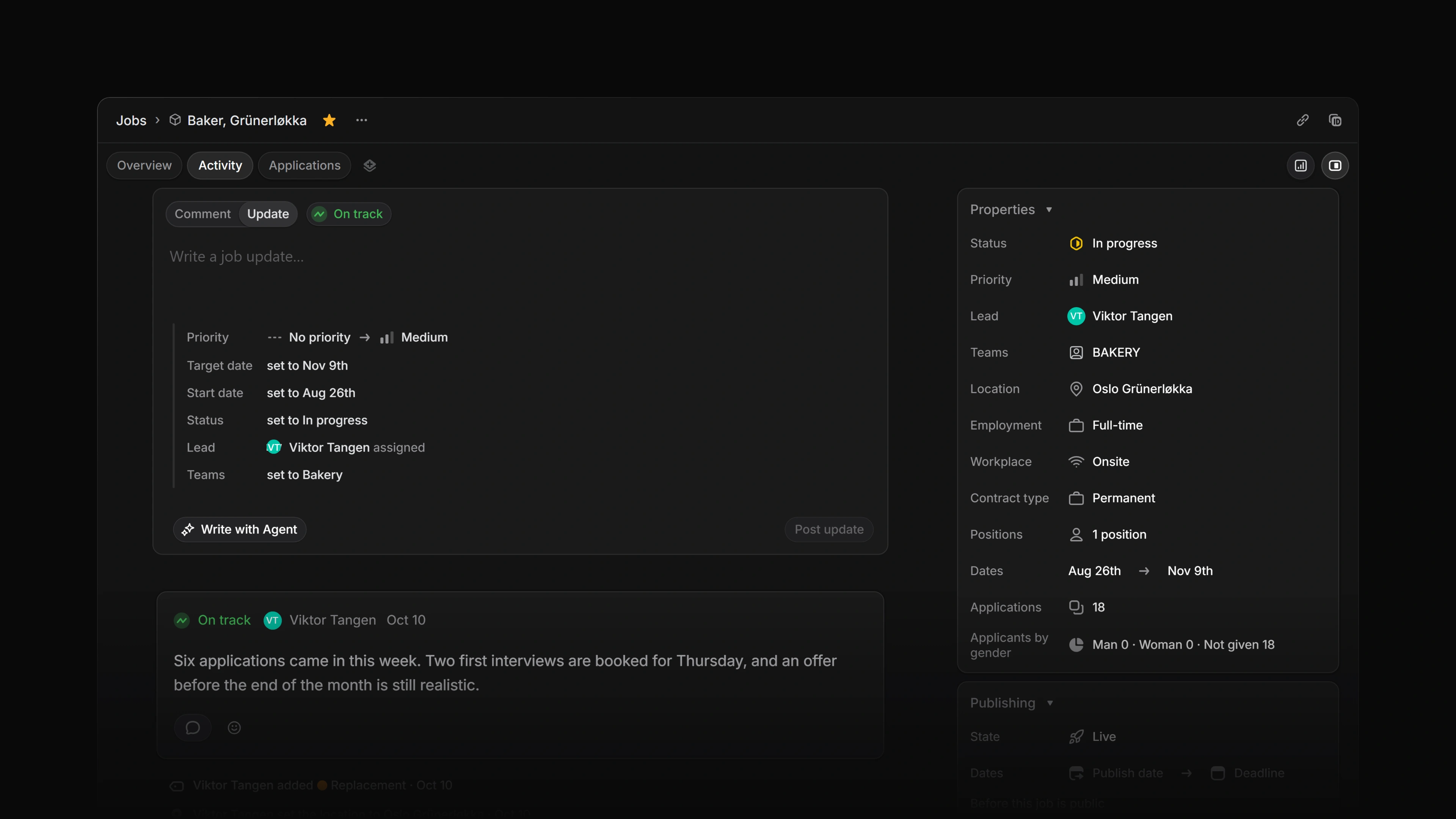 Zoom image
Who can post
Any active workspace member who can open the job can post an update, comment on one and react to one. The server checks your access to the job. It does not check your role.
Only the author can edit or delete an update. The same goes for a comment.
An archived job takes no new updates. A workspace in view-only mode refuses every post, edit and delete.
Who gets notified
A posted update goes to the inbox of the member who created the job, because creating a job subscribes you to it. Attia has no control for following a job, so nobody else gets a notification.
You get no notification for an update you post yourself. If the job belongs to a private team, the creator is notified only while they are a member of that team. See Notifications.
Write an update
- Open the job and go to the Activity tab.
- The composer has two tabs, Comment and Update. It opens on Update.
- Use Set job health to pick On track, At risk or Off track. A new update starts on On track.
- Write the update in the field that says Write a job update…. The text is required and can be up to 20,000 characters.
- Select Post update.
The update appears in the activity feed with your name, the health and the text.
Changes since the last update
When something on the job has changed since the last update, the composer lists it under your text. The list covers seven properties:
- Priority
- Target date
- Start date
- Status
- Lead
- Teams
- Progress
Progress only makes the list when it has moved by more than 2 percentage points. Label changes are not listed.
You cannot edit the list. Attia works it out again on the server when you post, and the posted update keeps it.
Write with Agent
In the Update tab, Write with Agent opens Attia Agent with the request "Help me write an update for this job". The Agent reads the job's recent activity before it drafts. See Attia Agent.
Edit or delete an update
Open the menu on your own update.
- Edit update lets you change the text. The health stays as you posted it. An edited update is marked Edited.
- Delete update asks you to confirm first. Deleting removes the update and every comment on it from the job's activity, and you cannot undo it.
The menu shows neither action on an update someone else wrote, and the server refuses both if you are not the author.
Comments and reactions
Each update has its own comment field, Leave a comment…. A comment starts a thread, and others answer in Leave a reply….
Anyone who can open the job can mark a comment in a thread with Mark as Solution, and take the mark off again with Remove Solution.
Add reaction puts an emoji on an update. Select the same emoji again to take it back.
The latest update on the Overview tab
The Overview tab shows the newest update under Latest update, with its health and its text. Update on that card takes you to the Activity tab to write the next one.
A job with no update yet shows Write first job update in the same place.