
Job graph
Read the chart of applications received, started and processed, and the prediction of when the rest are done.
Overview
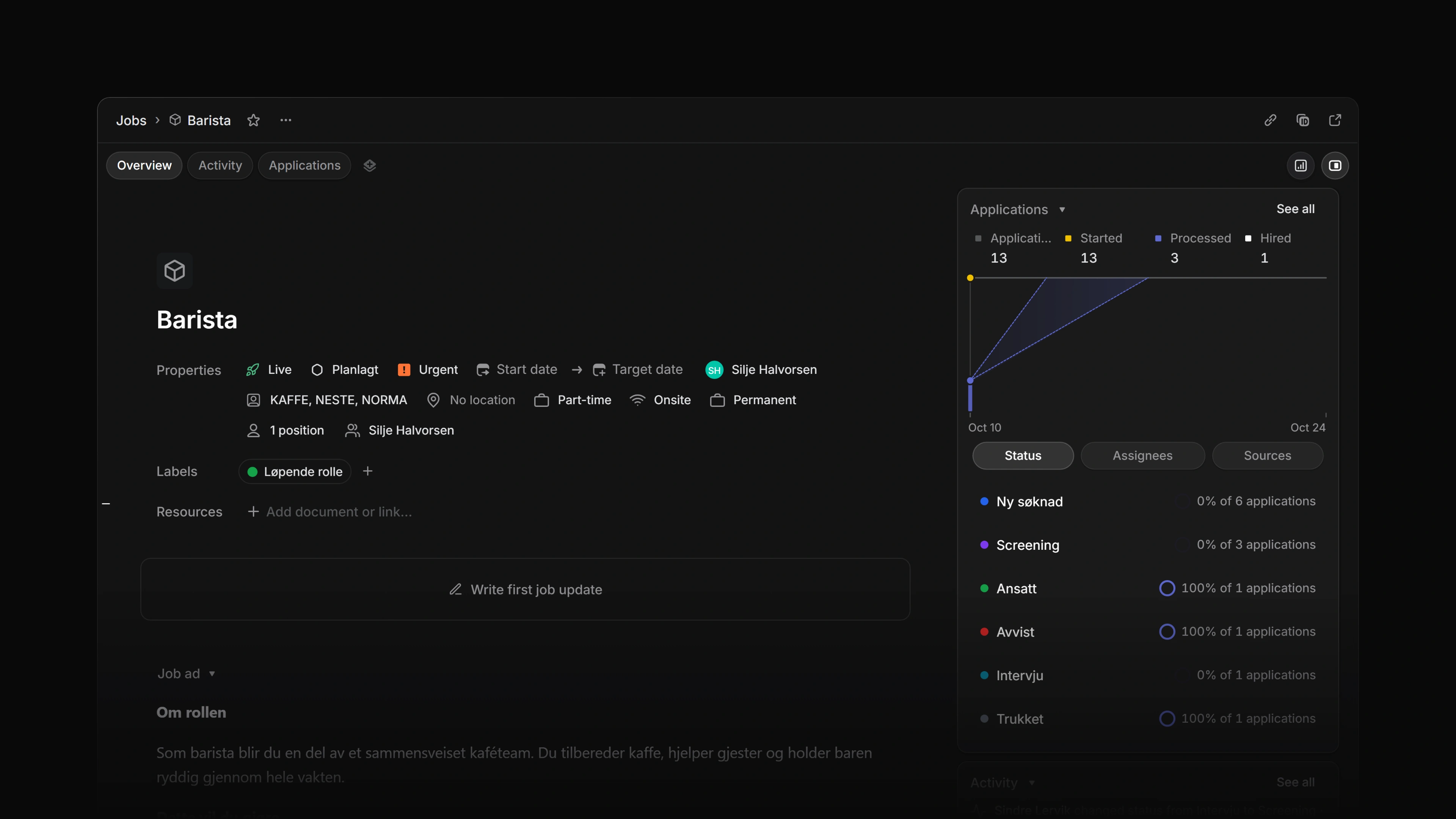
The job graph is the chart on a job's Applications card. It plots how many applications the job has received, how many are started and how many are processed, day by day, and it predicts when the remaining ones will be processed.
Everyone who can open the job sees the same graph. Nothing on it can be edited.
 Zoom image
Open the graph
Open a job and select Show details in the toolbar. The Applications card is in the details panel. See Job overview for the panel.
See all on the card opens the job's Applications tab.
Read the graph
The legend above the chart gives four figures: Applications, Started, Processed and Hired. Job overview defines each one and explains why three of them read low on a job past 1,000 applications.
The chart draws three of the four as lines that add up over time.
- Applications is every application to the job so far.
- Started is the applications actually received.
- Processed is the applications that reached an end, hire or rejection.
Hired is in the legend only.
Hover over a day to see the three counts for that date.
The date axis
The axis starts on the job's Start date and is labelled Start. A job with no start date starts the axis today, so the chart has no history to draw. Applications that arrived before the start date are counted into the first point.
Today marks the current day. The Started and Processed lines stop there.
The axis runs to the latest of these: 14 days after the start, today, the target date and the end of the prediction.
The target date
When the job has a Target date, the chart draws it as a red vertical line and labels it Target date. The area past the line is striped.
The prediction
A dotted line continues the Processed line into the future. It shows the day Attia expects every application to be processed. A shaded cone around it runs from the earliest likely day to the latest.
The prediction appears once at least one application is processed. Attia works it out like this:
- The average pace is the number of processed applications divided by the number of days from the start date through today, counting both.
- The expected day is the remaining applications divided by that pace.
- The early edge of the cone uses the faster of two paces: one and a half times the average, or the pace of the last 14 days.
- The late edge uses half the average pace.
Remaining means all applications minus the processed ones, so every new application moves the prediction later. When nothing remains, the prediction is today.
Compare the prediction with the red target date line. A cone that sits past the line says the job will not be done in time at the current pace.
The breakdown under the chart
Three tabs under the chart split the same applications another way: Status, Assignees and Sources. The card opens on Status.
Each row shows a group, the share of its applications that are processed, and the number of applications. Applications without an assignee are listed as Unassigned, and those without a source as No source. View on a row opens the job's Applications tab.