
AI credits
Add credits that pay for loop runs, set automatic reload, and see what the workspace spent.
Overview
AI credits pay for the Ask the AI agent step in Loops. A workspace holds one prepaid balance in US dollars, and every loop that runs that step draws on it, whoever owns the loop.
Credits are opt-in. Attia charges nothing for them until someone adds credits. While the balance is empty, a loop run stops when it reaches an Ask the AI agent step.
Chat with Attia Agent does not use credits. Chat runs on each person's own usage allowance.
Loops start on the Basic plan. See Loops.
 Zoom image
How credits are used
Only the Ask the AI agent step in a loop uses credits. The other steps, such as Change properties, Assign and Send message, cost nothing and run with an empty balance. Attia charges the agent's work to the balance after each turn, so there is no fixed price per run. The more work the agent does, the more it costs.
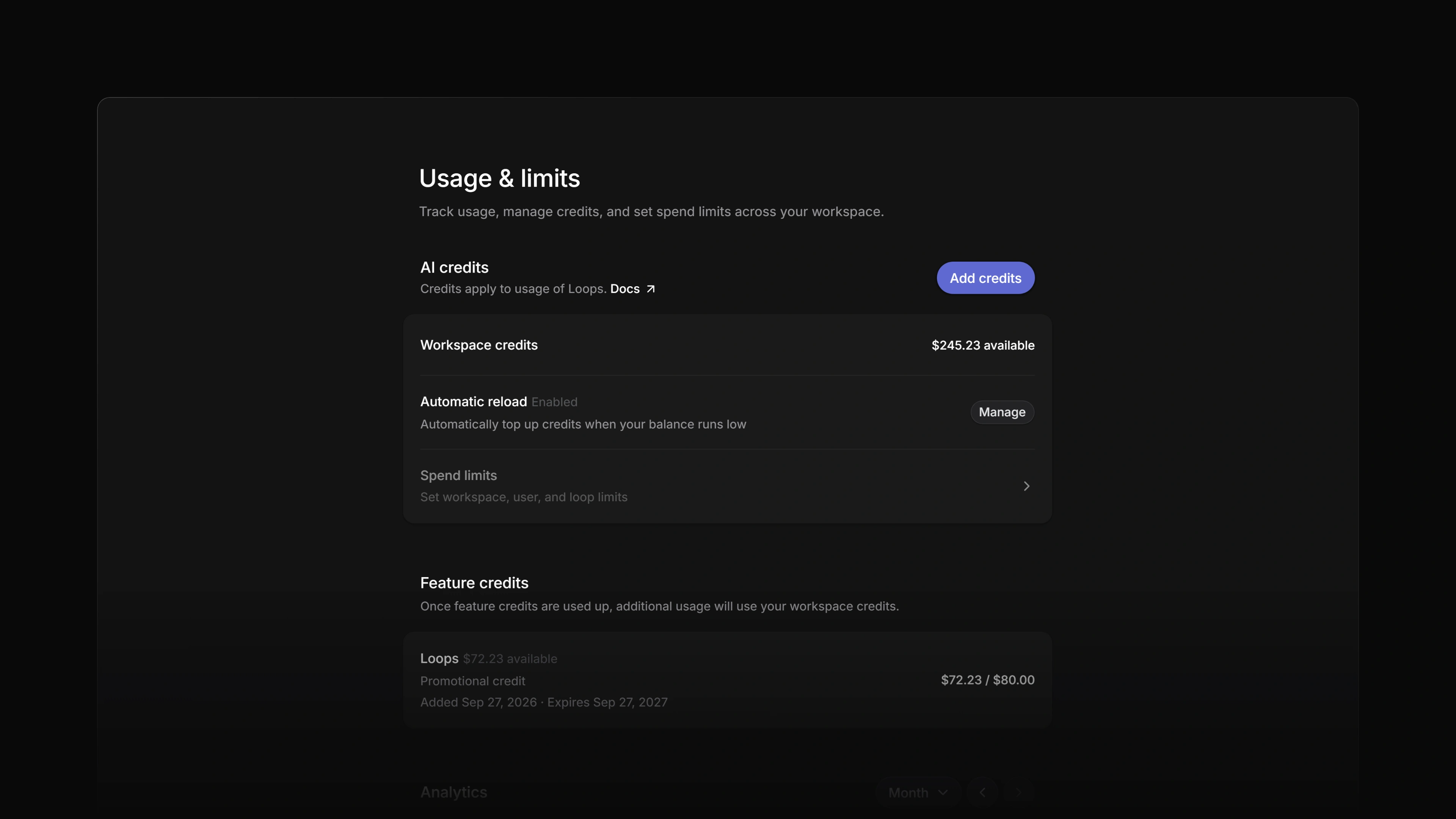
Workspace owners and admins see the balance under Workspace credits in Settings > Usage, and again under Create a new loop on the Loops page.
Add credits
Workspace owners and admins add credits. On the Free plan every member who is not a guest counts as a workspace admin. For everyone else the Usage row in the settings sidebar is locked, and the page itself answers "not found".
The workspace needs a billing account first. Without one, Attia answers This workspace has no billing account yet. Choose a plan to start one.
One-off purchase
- Open Settings > Usage. The page is titled Usage & limits.
- Select Add credits.
- Pick $50 or $75, or type another amount in the field beside them. An amount is a whole number of dollars from $10 to $5,000.
- Tick the box to accept Attia's AI Addendum and Acceptable Use Policy.
- Select Add credits. Attia sends you to Stripe Checkout, where you pay by card.
Stripe sends you back to the usage page, which reads Payment received. Your credits arrive within a minute. The balance moves once Stripe has confirmed the payment, not before. If you leave Checkout without paying, you see Checkout cancelled. Nothing was charged.
Automatic reload
Automatic reload tops the balance up when it runs low. It is off until an owner or admin turns it on.
- In Settings > Usage, select Manage on the Automatic reload row.
- Set When credits are below, from $10 to $5,000.
- Set Top up by, from $50 to $5,000. Both fields start at $100 and take whole dollars.
- Choose a saved card under Payment method. With no card saved, the dialog reads Needs a saved card. Add one in Billing.
- Tick the box to accept the terms and select Enable.
When a loop run takes the balance below the first amount, Attia charges the card the second amount and adds it as purchased credits. Feature credits do not count toward that balance.
To change the amounts or the card, select Manage again and then Save. Disable in the same dialog turns automatic reload off.
If a charge fails, automatic reload pauses and the row says why: Paused: card declined, Paused: card needs authentication, Paused: card removed, Paused: no billing account or Paused: charge failed. Nothing is charged again until an owner or admin saves the settings again.
Payment and currency
Credits are bought in US dollars and paid by card. Stripe handles the payment.
Expiration
Credits expire 12 months after they are added. The Add credits dialog says the same: Unused credits expire 12 months after purchase.
The Feature credits section lists each feature credit with the day it was added and the day it expires. An expired credit no longer counts toward the balance.
Order of use
A workspace can hold several kinds of credit at once. A loop run spends them in this order:
- Feature credits for Loops, then workspace credits.
- Inside each of those, promotional credits first, then credits Attia support added, then credits you bought.
- Inside each kind, the credit closest to its expiry date.
One run can draw on more than one of them.
Running out of credits
When the balance reaches zero, a loop run stops when it reaches an Ask the AI agent step. The steps before it have already run. The run shows in the loop's run history as Skipped, with the reason No AI credits left. The loop stays on, and its next run checks the balance again. A loop with no Ask the AI agent step runs as usual.
An agent step that has already started finishes its work, so the balance can end slightly below zero. The next credits you add cover that amount first. With a balance of -$1, adding $50 leaves $49.
Review usage
Settings > Usage also shows what the workspace spent.
Analytics gives the total spend for a month, a chart of spend per day, and a table with a row for Agent sessions and one for Loops. Use the Month menu or the arrows beside it to change month. Attia keeps three months of usage, and days are counted in UTC.
Dashboard splits the same spend by source. View all usage sessions opens History, which lists each session with its User, Team, Feature, Started, Last activity and Cost. Filter the list by Month and Feature.
Refunds and disputes
If a credits payment is refunded, Attia takes the refunded amount out of what is left of that purchase.
If a payment is disputed with the card issuer, Attia freezes what is left of that purchase until the dispute closes. A lost dispute removes it and a won one puts it back. While a dispute is open, automatic reload waits, and its row reads Automatic reload is paused while a payment dispute is open.