Workspace search
 Zoom image
A candidate calls about a job, and you remember their name but not which job they applied to. Until now you opened one job or list after another to find them.
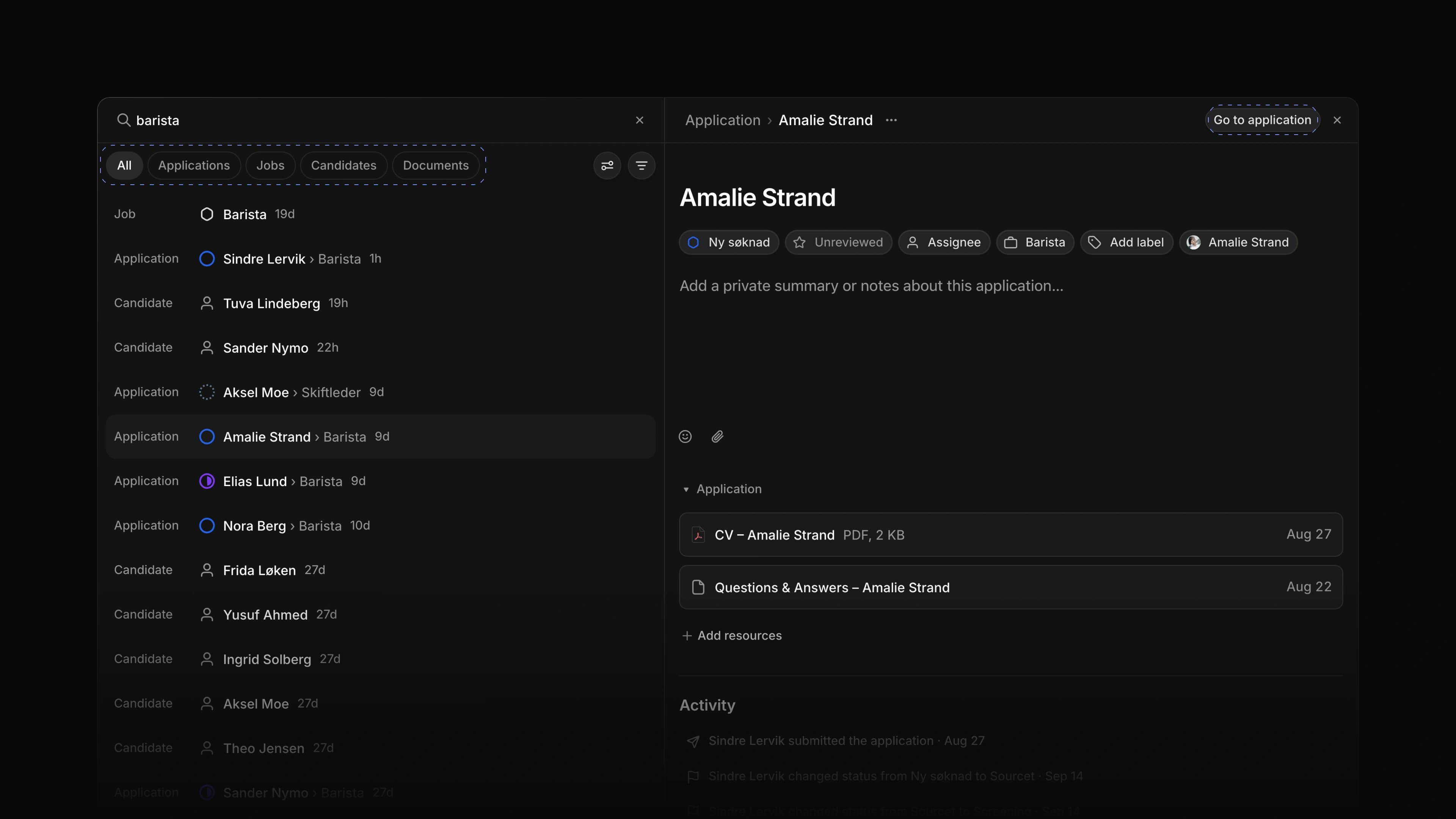
Search now finds applications, jobs, candidates and documents by name, all from one page. The results show up as you type, and each one says what kind of record it is.
Type "barista" and you get the Barista job and the applications to it in one list. To start, press / anywhere in Attia, or choose the search button at the top of the sidebar.
One tab per type
Choose All, Applications, Jobs, Candidates or Documents above the results to see one kind of record at a time.
A preview beside the results
Choose a result and it opens beside the list, so you can read an application or a job and keep your search. Drag the edge to make the preview wider. Go to application, or Go to job, opens the full page.
Filters and ordering
The filter menu narrows the results by team, status type, assignee or lead, creator, and the date a record was created or last updated. Under Display options, order them by Most relevant, Last updated or Last created.
Recent searches
Press Enter or open a result and Attia keeps the search. When the box is empty, Recent searches lists them again, and Clear History removes them.
Team home
Each team now has a home page. The Overview tab shows the team's name, icon and description, which you edit in place, with its members and Go to links to the team's applications, jobs, views and Team settings. The Documents tab lists the team's documents, grouped by the job they belong to. To open it, choose Home under the team in the sidebar.
File upload questions
A job's application questions can now ask for a file. On the job, choose Add question, set the type to File upload and pick the allowed file types, such as PDF, Image or Document. On the career site, the candidate attaches the file to that question when they apply.
- Career sites Changed applying on a career site so the candidate fills in the whole form first and confirms their email with a one-time code when they send it.
- Keyboard shortcuts Added
/to open search from anywhere in Attia. - Keyboard shortcuts Added
Cmd/CtrlShift,to copy the link to the page you are on.
- Jobs Fixed a job's Activity staying at No activity yet after you changed the job.
- Jobs Fixed application questions being saved as required after you marked them optional.
- Jobs Fixed job icons that showed blank, or went back to the default icon after a reload.
- Jobs Fixed the details panel on a job going back to its default width after a reload.