Loops for new applications
 Zoom image
Every new application starts the same way. The candidate wants to know it arrived, and someone on the team reads it to see what it says and what to ask. Until now a person did both by hand for every application, and a Loop that could help started from an empty form.
Two new Loop templates now take that first step. Thanks for applying emails every applicant from your career site right after they apply, and Brief new applications writes a short brief into each new application's private summary. On the Loops page, Create a new loop now has every way to start one: pick a template, describe the Loop in a sentence or start from scratch.
Say you hire baristas for a coffee roaster and post the job on your career site. A candidate applies on Sunday evening. She gets a thank-you email from Attia a minute later, and on Monday morning her application already has a brief of what she wrote about each requirement in the ad. To start, choose Loops in the sidebar and pick Thanks for applying under Create a new loop. If you already have Loops, choose New loop first.
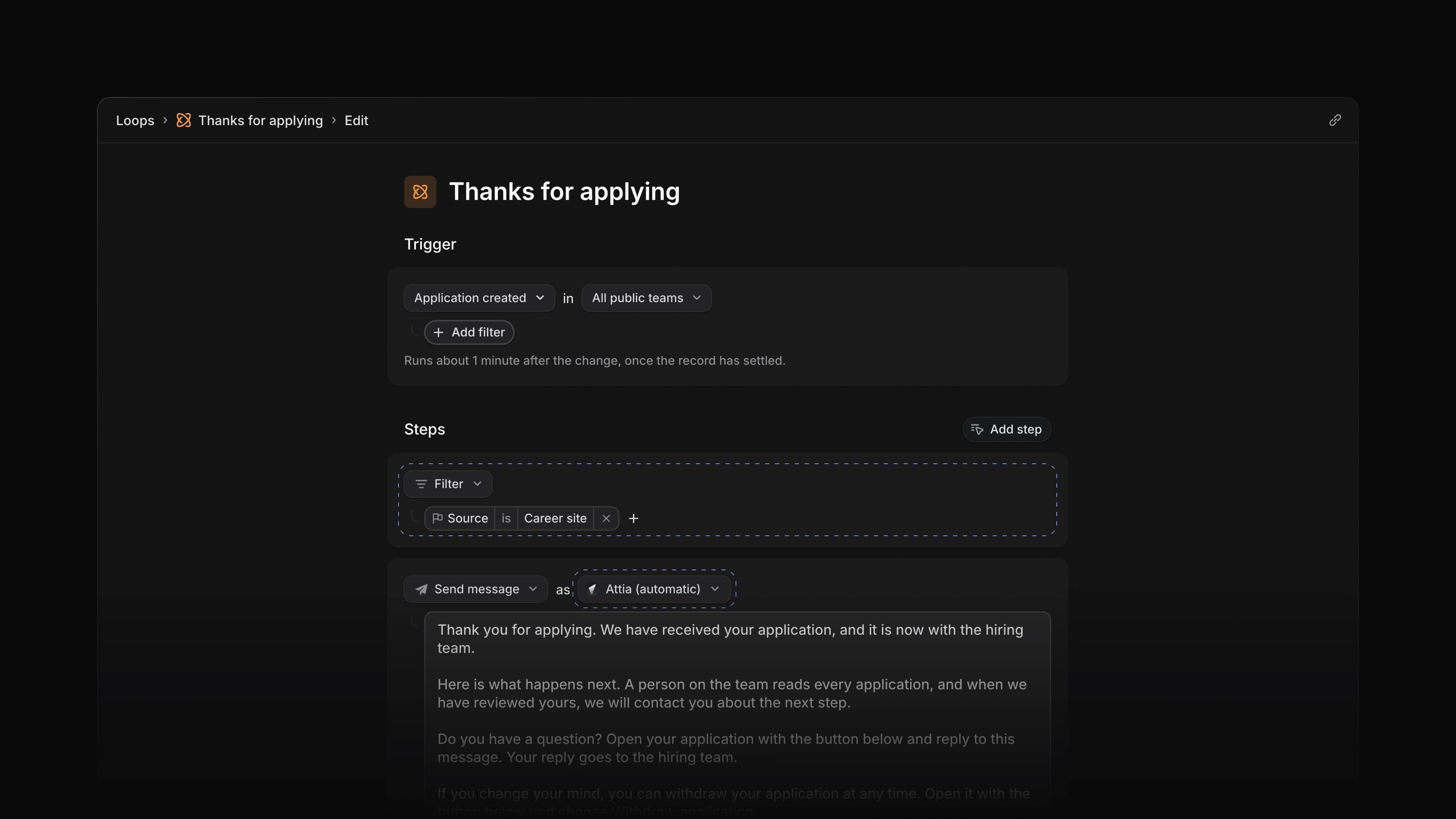
Thanks for applying
The Thanks for applying template emails the candidate that the application arrived, what happens next, how to ask a question and how to withdraw. Attia (automatic) sends it, so nobody on the team has to write or send anything. It goes only to people who applied through your career site, not to candidates you added yourself. The candidate can reply from their application page, and the reply goes to the hiring team. The template runs no Agent, so it uses no AI credits. Any Send message step can now send as Attia (automatic) too.
Like every template, it is saved switched off. Read the message, change it if you like, then choose Publish and switch the Loop on.
Application briefs
Brief new applications reads each new application and writes a brief into Private summary and notes. It writes only while that field is empty, so it never replaces notes your team wrote. The brief has four parts: a one-line headline, a line for each of up to six requirements in the job ad, with a quote and whether it came from the CV, the cover letter or an answer, at most three questions to clarify, and practical facts such as start date, location and salary. A requirement the application does not mention reads Not stated. Every brief ends with "AI summary. Check the sources."
The brief quotes the application and never ranks or scores the candidate. The judgement stays with you.
Templates and prompts
With no Loops yet, the Loops page shows Create a new loop. Once you have one, choose New loop or press N then L to open it in a dialog. Before Attia creates anything, it asks where the Loop goes: the workspace or one of your teams.
Pick one of the seven templates, and Attia saves it as a draft that is switched off and opens it in the editor, with Attia Agent beside it to go through the draft with you. When a template depends on how your workspace is set up, the Agent asks first. Route new applications, for example, asks who gets an application when the job has no lead. Thanks for applying opens without the Agent, since its message is already written.
Or describe the Loop in the box that reads Ask Attia to build the loop for you. Attia Agent turns it into a draft with the trigger and instructions filled in, and the editor opens with that chat in its own tab, so you can keep asking for changes. Nothing runs until you publish.
Loop changes with Attia Agent
In a Loop's editor, Configure with Agent now changes the steps too, so you can ask it to improve a Loop. It changes the draft, and nothing runs until you publish. From any other chat, ask Attia Agent to rename a Loop or to change when a scheduled Loop runs. It saves the change as a draft, sums it up and asks to publish, and nothing goes live until you choose Approve.
Job update drafts
Choose Write with Agent in the update box on a job's Activity. Attia Agent reads the job's recent activity, fills the box with a complete update and picks a health, On track, At risk or Off track, with a sentence on why in the chat. Check the update and choose Post update. The Agent never posts it for you.
Edits in place
Ask Attia Agent to change something that already exists, and it edits that instead of making a new one. It rewrites a job update you posted, including one from before the chat, and changes a question in your library, which then shows on every job that asks it. Asked to fill in a job template, it edits the template you named instead of offering a second one. It follows the same rules as the app: you edit only your own updates, and only the questions and templates you may manage.
AI credits
Admins can now buy AI credits. Open Settings, choose Usage and choose Add credits, pick an amount and pay, and the credits arrive within a minute. Under Automatic reload, set When credits are below and Top up by, and pick a saved card. Attia then charges that card each time the credits drop below your amount. Loop runs now draw from the workspace's AI credits instead of the Loop owner's own Agent allowance. When the credits run out, a Loop does not start its Agent, and the run says so.
- Agent Changed the questions Attia Agent asks to show as buttons under its message; choose one, or type your own answer.
- Loops Changed the Loops list to a shorter row per Loop, with the description on one line.
- Loops Added Edit loop to a run that is waiting for input.
- Agent Fixed a change made by Attia Agent starting the Loops that watch for it up to five minutes late.
- Agent Fixed Attia Agent giving a vague reason when it could not edit a candidate or move an application; it now says who may.
- Loops Fixed Assign to selected members having no way to choose the members.
- Loops Fixed a Filter step offering starts with and ends with, which the Loop could not save.
- Loops Fixed Run now on a job Loop not giving Attia Agent the job you chose.
- Billing Fixed the plan cards on a phone repeating words such as SSO and showing a line in English on the Norwegian page.