Keyboard shortcuts
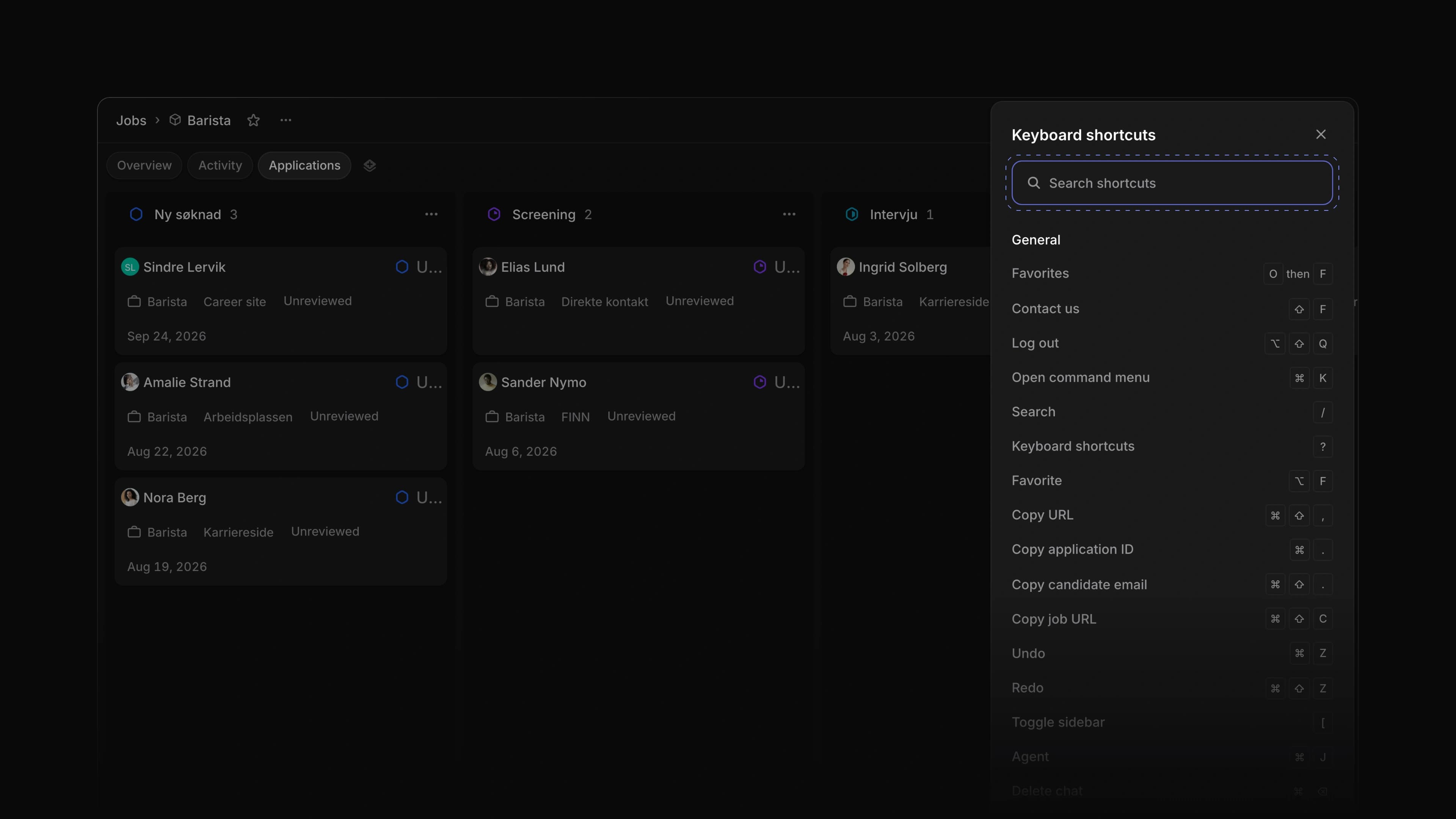 Zoom image
Attia had keys for many things, but no single place to look them up and no keys to move between pages or create something. The hints in menus were typed out by hand, and the keys that set a field followed the row under your pointer even when you had selected other rows.
A new Keyboard shortcuts panel shows every key in one place. G then a letter takes you to a page, N then a letter creates something, and J then a letter sets a field on the job you have open. The keys that set a field now work on every row you selected, and the menus show the same keys the panel does.
Say you are sorting new jobs for a coffee roaster. Press G then J to open Jobs, select five jobs with X, press S and pick a status, and all five move. Press ? to look up any other key.
One panel for every key
The panel slides in from the right and lists the keys in groups, starting with General. Type in Search shortcuts to find a key by name. ? opens it outside a text field, and Cmd /, or Ctrl / on Windows, opens it from anywhere, even while you type. Keyboard shortcuts in the help menu at the bottom of the sidebar opens it too.
Go, create and set with a letter
G then a letter goes to a page in the sidebar: I for Inbox, M for My Applications, J for Jobs, C for Candidates, V for Views, L for Loops, W for Career sites and T for Teams. Inside a team, G then A opens the team's applications.
N then a letter creates something: C for a candidate, V for a view, L for a Loop and D for a document. Option C creates a job from a template.
On a job page, J then a letter sets the job itself: S for status, P for priority, M for lead, T for teams and L for labels. S alone still sets the status of the application you point at.
Keys for your selection
Select rows with X, then press a field key such as S for status or L for labels. The list opens on one of the selected rows, and what you pick applies to every selected row, wherever your pointer is. This works in lists and on boards. On the Jobs list, Option F adds every selected job to your favorites, or removes them all when each one is already a favorite.
Key hints in menus
The keys shown in the command menu, the help and account menus in the sidebar, the Inbox menus and the Attia Agent menu now come from the same list as the panel. In these menus, when a hint names a key, that key does what the hint says.
- Career sites Added a Career site made with Attia line to the footer of a published career site on the Free plan.
- Keyboard shortcuts Added each page's keys to its sidebar tooltip, so pointing at Jobs shows
GthenJ. - Keyboard shortcuts Added
OptionVto save the filters you set as a new view. - Keyboard shortcuts Added
Cmd/CtrlZto the candidate page, so it takes back a label, location or phone change, or a save from the edit dialog. - Keyboard shortcuts Added
ShiftFto open Contact us from any page. - Keyboard shortcuts Moved Keyboard shortcuts above Settings in the help menu, with its keys beside it.
- Keyboard shortcuts Changed
JthenLin Create job to open Labels while Labels sits under the … menu. - Keyboard shortcuts Changed Settings pages to answer
GthenSto open Settings,Cto create a job,OthenFto open favorites, andOptionShiftQto log out. - Keyboard shortcuts Changed
OptionShiftQto log you out on a Mac too. - Keyboard shortcuts Changed
GthenSto work while a popover such as Display options is open. - Keyboard shortcuts Changed the keys for a row you point at, such as
Xto select andOto open, to work after you clicked a button or link outside the list.
- Jobs Fixed
J,Kand other list keys moving or changing the list behind an open dialog, such as Create job. - Jobs Fixed field keys opening a picker in a minimized Create job dialog.
- Views Fixed keys 1 to 9 not picking a view on the Jobs list, as they already did on Candidates.
- Applications Fixed
Cmd/CtrlShift,on an application page copying twice and showing two messages. - Career sites Fixed
Cmd/CtrlZin the page designer also undoing your last change elsewhere in Attia. - Teams Fixed a team member with no name showing as a dash on the team's Members page in Settings; it now says Unknown member.
- Members Fixed a member with no name showing as Workspace member in English on Norwegian pages.
- Workspace Fixed menus, tooltips and hover cards opening behind a dialog.