Invitations on the Members page
 Zoom image
The Members page in the sidebar showed only the people who had joined. To see who you had invited and not heard back from, you had to go to Settings.
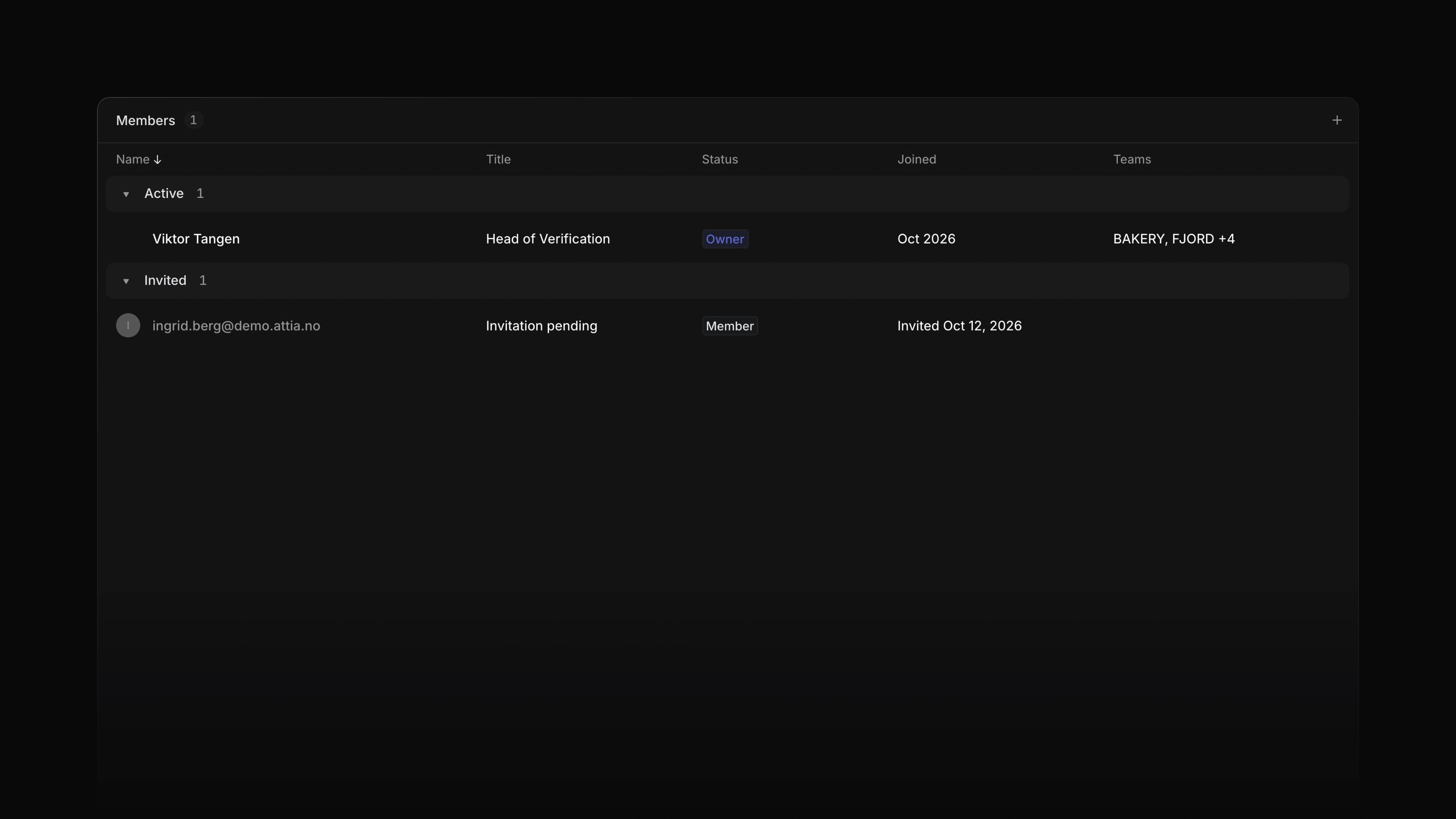
Now the Members page lists them too. The table groups by State, with Active members first and Invited below, so you can see who joined and who still has an invitation waiting.
Invited rows
Each invitation is a muted row with the email address, the role you invited them to and the date you sent it.
Resend or cancel
Right-click an invited row to choose Resend invite or Cancel invite. Both do the same as on the Members page in Settings, and only admins see them.
Your views
The page groups by State unless you choose otherwise. A saved view of the Members page keeps the grouping it was saved with.
- Views Added the column menu to the Applications table on a job page and to the tables in Settings; right-click a column header to filter, sort, group or hide.
- Filters Changed Filter in the column menu to open straight on that column's values.
- Jobs Changed the question rows on a job's Overview to open only when there is something inside, and moved the options of a select question and the file categories of a file question into the open row.
- Members Fixed a profile picture showing a coloured ring around it.
- Documents Fixed the floating table of contents staying open when you clicked in it and then moved the pointer away.