Import candidates from any PDF
 Zoom image
You find a good person, and what you have is a PDF: their CV, a LinkedIn export or a LinkedIn page you printed. Until now you copied their details into Attia one field at a time, and their work history not at all.
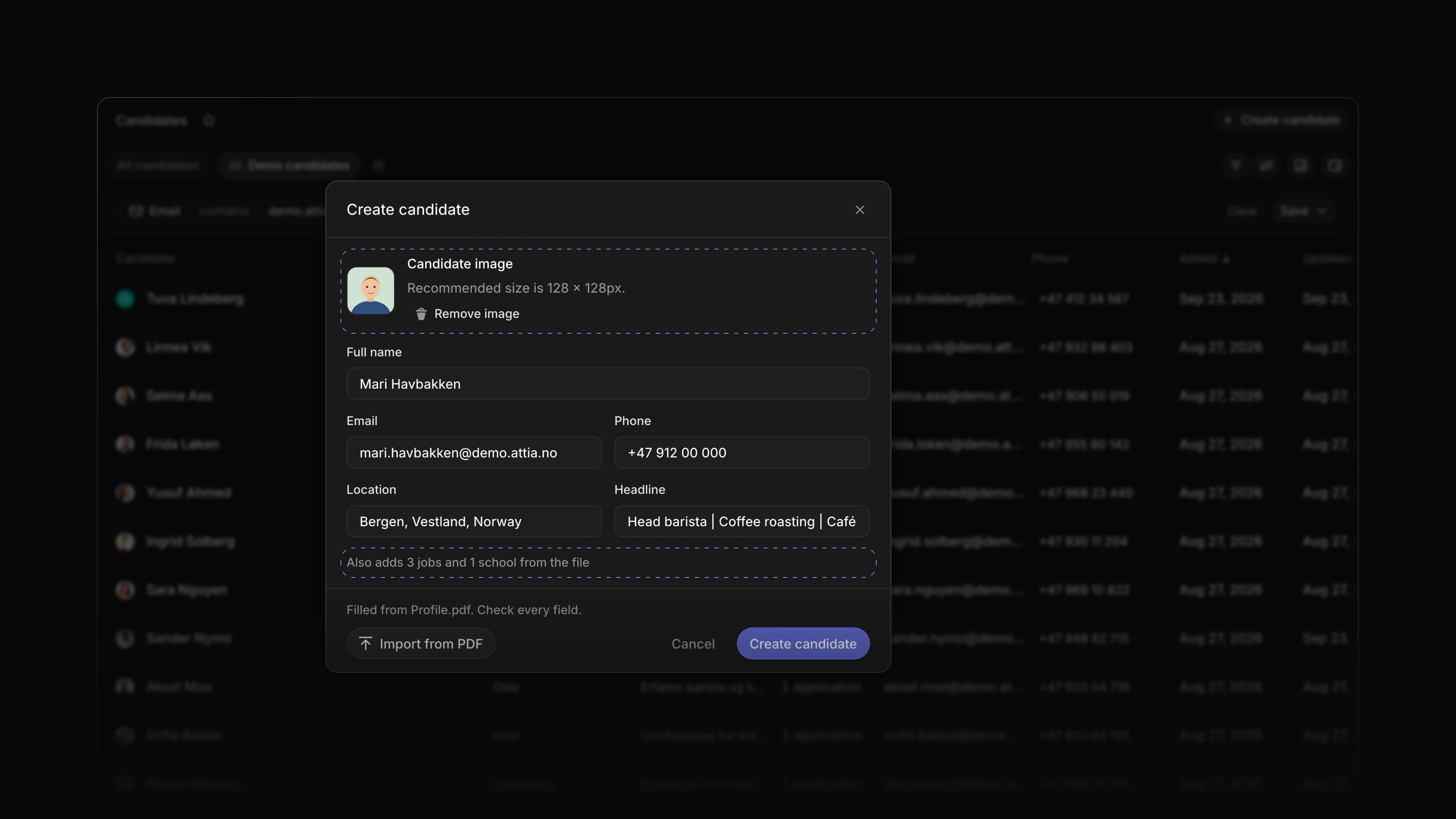
Import from PDF in Create candidate now reads any of these files. Attia fills in the name, headline, location, email and phone, puts the person's photo on the candidate, and adds the jobs and schools it finds to Experience and Education.
To start, open Create candidate and choose Import from PDF. For a LinkedIn profile, open the profile, choose More, then Save to PDF, and import that file.
A check before you save
The dialog tells you which file it read and how many jobs and schools it will add, and asks you to check every field. Attia saves nothing until you choose Create candidate.
The photo
When the file has a photo of the person, Attia shows it as the candidate's picture in the dialog. Choose Remove image if you do not want it. A picture you already chose stays, and Attia never uses a company logo as the photo.
The PDF on the candidate
Attia keeps the file you imported under Files on the candidate, so the profile you based the record on is one click away later.
Telling the candidate
A candidate you import did not apply to you. Attia does not email the person when you import them, so tell them yourself that you added them and why.
Attia Agent creates candidates from a PDF
Drop a CV or a profile PDF into the Attia Agent chat. The agent reads the name, headline, location, email and phone, and the jobs and schools in the file. It shows you what it read, and when you say yes it creates the candidate with those jobs and schools under Experience and Education.
One PDF for the whole application
On a career site, an applicant can choose Autofill from resume and upload one PDF. Attia fills in the application from it and attaches the same file as their CV, so they upload it once. An applicant who is signed in and has applied before can send the CV they used last time.
- Agent Changed Attia Agent to explain how to save a profile as a PDF when you paste a link to a LinkedIn profile.
- Candidates Changed Create candidate to stop asking why you store the person's details; Attia records that you added them to the talent pool for future roles.
- Candidates Added Fill from my CV to an empty Profile page in the candidate account; it fills in the jobs and schools from the CV the candidate sent, or from a PDF they upload, for them to check.
- Career sites Fixed the career site page editor not showing a change Attia Agent made until you reloaded the page.
- Applications Fixed an applications list leaving out a label you set on an application; each row now shows the labels set on that application.
- Candidates Fixed the button that shows and hides the details panel on a candidate page; it now sits below the header, as on other pages.