Free months for referrals
 Zoom image
People who hire know other people who hire. Until now, when you told one of them about Attia, they got a better way to hire, and you got nothing back.
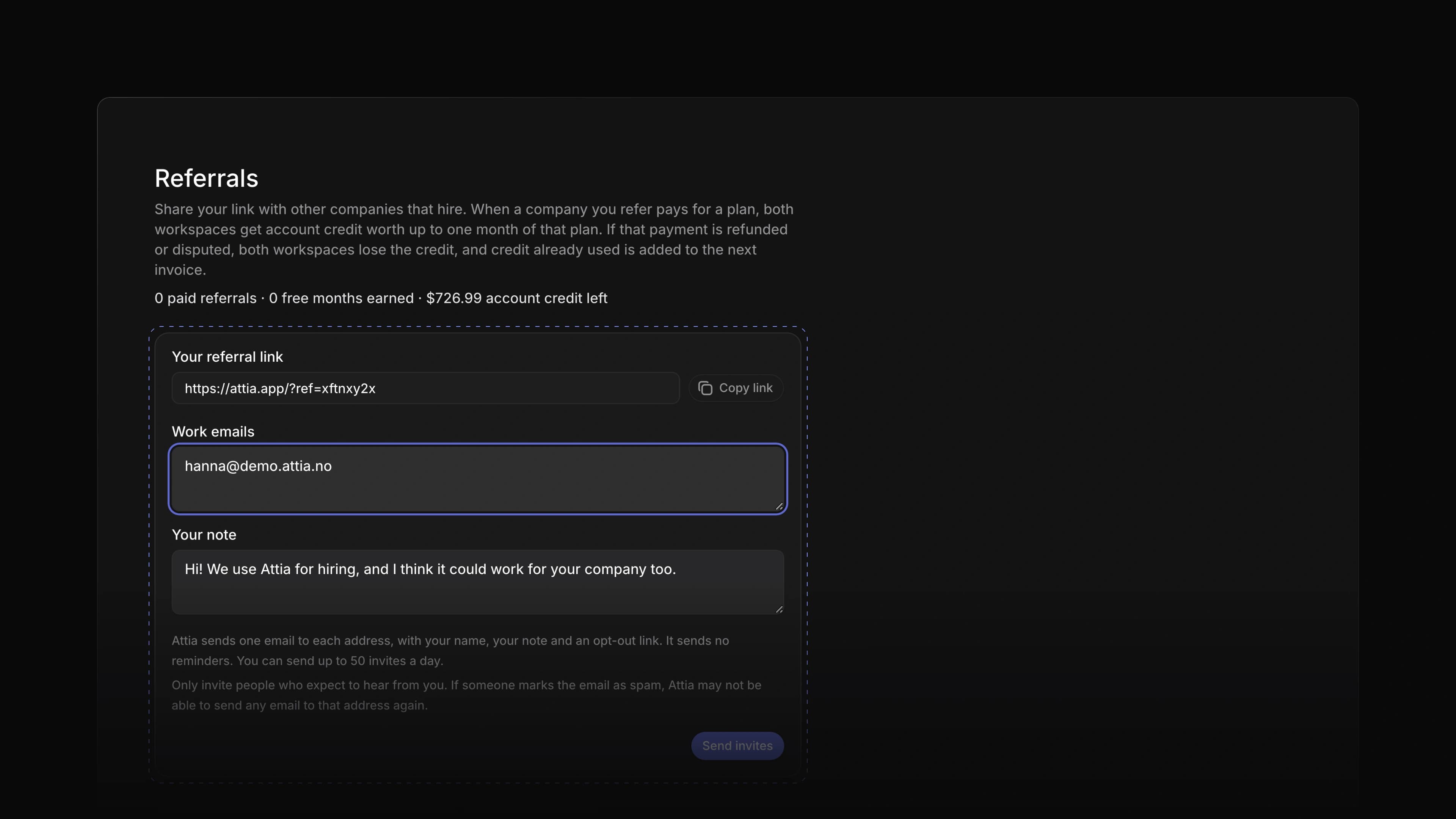
Now every workspace has its own referral link. When a company signs up through it and pays its first invoice, both workspaces get a free month as credit on their Attia bill. You can earn a free month for up to 12 companies a year.
The credit is one month of the plan the new company pays for, for each seat they pay for. So if you refer a company that is bigger than yours, one referral can pay for more than a month of your own plan. Credit you do not use goes to your next invoices, and it does not expire.
Say a friend runs hiring at a hotel group. Send them your link. When they pay their first invoice, both workspaces get a free month, and the owners and admins in your workspace get an email with the amount. To start, open Settings and choose Referrals.
One link for your workspace
Copy your link and share it where people who hire meet, such as a LinkedIn post or an HR group chat. Every member of the workspace can share it. A new workspace also sees its own link right after it chooses a paid plan, under "Who else do you know who hires?"
Invites in your name
Type their work emails and add a note. Attia sends each person one email in your name, with your note and a Try Attia button, and a reply goes to you. Attia sends no reminders, so nobody gets chased. A workspace can send up to 50 invites a day.
Credit for both
Both workspaces get the credit, and it comes off their next invoices. You do not have to ask us for it. A yearly plan gives one twelfth of the year. The new company has 90 days from sign-up to pay, and a discount on that first invoice makes the credit smaller for both. If your workspace is on the Free plan, your credit waits until you start a paid plan. If the payment is refunded or disputed, both workspaces lose the credit, and any credit already used is added to the next invoice.
Every referral in one place
The table lists each invite and link sign-up with its status, such as Sent, Clicked, Signed up or Paid, and the credit it earned. The top of the page counts your paid referrals and free months. Owners and admins also see how much account credit is left.
Pages that open at once
A job, a candidate or an application now opens the moment you click it. The title, properties and status show at once, and the rest, such as files and the timeline, fills in just after. After Create job, you can open the new job right away, before Attia has finished saving it. Create candidate closes at once, and the new candidate is already in the list. The Inbox and Candidates lists show their rows at once on every visit. When another member changes something, or you change it in another tab, the pages you have open show it without a reload.
Offline edits on jobs
When your connection drops, your changes to jobs now wait instead of failing. That covers edits and drags on the Jobs list and board, a job's title and summary on its Overview, and the properties you pick on a job. They stay through a reload, and they save when you are back online. If Attia cannot save a change, you see Change not saved with the reason, or Try again when the connection failed.
- Applications Changed replies and private notes on an application to show the moment you send them, without locking the note box.
- Applications Added Try again to the message when a change to an application's status fails.
- Candidates Changed Create candidate to open again with what you typed when Attia refuses the new candidate, and to offer Try again when the connection failed.
- Views Added Ask Agent to the bar that shows when you select rows. It starts a message to Attia Agent with the selected rows in it.
- Performance Changed Attia Agent to start its reply sooner.
- Performance Changed the Jobs list and board and the Candidates list to draw faster.
- Performance Changed Open full page on a document to show its text at once instead of a grey bar.
- Performance Changed the Plans and AI & Agents pages in Settings to open sooner.
- Performance Changed Open app on the Attia website to open your workspace in one page load instead of two.
- Performance Changed the sidebar to show your teams and Candidates as soon as a page loads, so the rows below no longer jump down.
- Performance Changed the workspace logos under Switch workspace to show with their rows instead of a moment later.
- Keyboard shortcuts Changed the key for Lead to
Aon the job you point at in the Jobs list and in Create job, and toJthenAon a job's page.M, andJthenMon a job's page, now edit Members.
- Agent Fixed Attia Agent getting stuck when it asked you to approve two changes at once, so that neither change saved.
- Agent Fixed the Attia Agent chat freezing when you chose Approve before you answered a question in the same message.
- Agent Fixed a failed send in the Attia Agent chat emptying the message box; it now keeps your text and offers Try again.
- Agent Fixed typing
@in the Attia Agent chat opening no mention menu. - Agent Fixed Attia Agent not finding your team's job templates when you asked it to change one, and naming a template's blanks in its own words.
- Agent Fixed Attia Agent guessing what starts a Loop instead of naming its trigger, and giving the wrong reason when it could not change a Loop's schedule.
- Agent Fixed Attia Agent asking to publish a Loop without naming changes someone else had saved to its draft.
- Loops Fixed Run now on a Loop sometimes starting the run minutes after you pressed it.
- Loops Fixed Run now on a scheduled Loop over jobs or applications showing an error; the button is now turned off and says why.
- Loops Fixed a Loop run that waits on a question from Attia Agent showing a code on its page, and only New activity in Inbox.
- Loops Fixed the Source condition in a Loop's Filter step showing a code instead of Career site.
- Jobs Fixed dragging a job to another Contract type column on the Jobs board leaving its contract type unchanged.
- Jobs Fixed dragging a job into another column and group on a board with sub-groups saving only the new column.
- Jobs Fixed Contract type and Positions on a job's page snapping back with an error instead of saving.
- Jobs Fixed a property on a job's page showing the wrong value when you changed it twice quickly and the first change failed.
- Jobs Fixed a failed save of a job's title, summary or ad throwing away the text you had typed.
- Jobs Fixed a new job that could not be created opening a page that said it was not found, instead of going back to the Jobs list.
- Jobs Fixed a Creating a job draft with the new job's title showing up in Drafts after Create job.
- Jobs Fixed a job you had just deleted showing for a moment when you reloaded the Jobs list in another tab.
- Jobs Fixed going from a job's Applications tab to Overview and back resetting the layout and grouping of the applications table.
- Applications Fixed a failed card move on the Jobs and Applications boards showing two error messages.
- Applications Fixed Try again after a failed move on the Applications board leaving the card in its old column.
- Applications Fixed the reply button on an application's note thread staying locked with no message when the connection dropped.
- Applications Fixed a teammate's note disappearing from an application while your own note was sending.
- Candidates Fixed changes failing on a candidate who had linked their own Attia profile. Their name, photo and location now come from that profile, and the Candidates table marks those candidates.
- Views Fixed adding a label with several rows selected changing only one row.
- Filters Fixed the filter for a date, such as Created, offering is and is not instead of before, on and after.
- Editor Fixed a job's ad, a document or a team's description showing old text when you went back to a tab after saving in another tab.
- Teams Fixed the Teams page showing 0 teams and no teams available for a moment on a first visit.
- Teams Fixed the back link covering the page title on some of a team's settings pages on a phone.
- Teams Fixed the help under Extended review scale in a team's settings telling you to split an application, which you cannot do.
- Settings Fixed help in a team's settings, New team and Manage workspace templates mentioning estimates, projects, cycles and recurring issues, which Attia does not have.
- Settings Fixed the workspace name field in Settings locking until each save finished.
- Members Fixed an invite link showing an error page when you opened it signed in to an account with no invite waiting.
- Workspace Fixed a new workspace showing an error page on every visit when setup stopped right after Create workspace.
- Workspace Fixed Pick a workspace saying you had no workspaces when you came back to the tab while your new workspace was still being created.
- Workspace Fixed a warning that the data may be out of date showing on a quiet workspace when nothing had changed.
- Workspace Fixed a role change on the Members page or a deleted view on Views being lost without a warning when you closed the page before it saved.
- Career sites Fixed a hidden field on the apply page taking a
Tabstop. - Accessibility Fixed the arrow keys doing nothing in the account menu, and
TabthenEnteron the workspace name in the sidebar opening no menu on a freshly loaded page. - Accessibility Fixed the hovered or selected row in menus, such as the account menu, showing no highlight in the light theme.
- Accessibility Fixed the Workspace heading in the sidebar showing no focus ring when you reached it with the keyboard.
- Accessibility Fixed
LeftandRightsometimes leaving a card in its own column when you move it on a board with the keyboard. - Keyboard shortcuts Fixed pressing
CmdZ, orCtrlZon Windows, twice quickly undoing only one change.